
Identity is not session: what happens to tokens and credentials that have already been issued in Azure, AWS, and Google Cloud, and why offboarding must go beyond disabling an account.
There is an idea that sounds intuitive but can be dangerously incomplete in federated environments:
If I disable the user in the identity provider, they should no longer be able to access the cloud.
That is true for new authentication attempts. But not necessarily for sessions that already exist.
We saw this very clearly when shutting down one of the training environments that inspired this series. The users were disabled in Microsoft Entra ID and their IdP sessions were revoked, but that did not mean every session previously issued by the different cloud providers disappeared instantly.
The reason is simple:
centralizing identity does not mean centralizing the lifecycle of every session.
That distinction matters especially in offboarding, incident response, and compromised-account scenarios.
Four different things: identity, authentication, authorization, and session
Throughout the previous articles in this series, we have separated concepts that are often mixed together.
Identity
   ↓
Authentication
   ↓
Authorization
   ↓
Session / temporary credentials
Identity answers who the user is.
Authentication verifies that identity.
Authorization determines what the user is allowed to do.
The session is the operational result that allows access to continue for a period of time without repeating the entire process from scratch.
When we disable an identity, we are acting on the first layer. But the later layers may already have produced their own tokens, cookies, or temporary credentials.
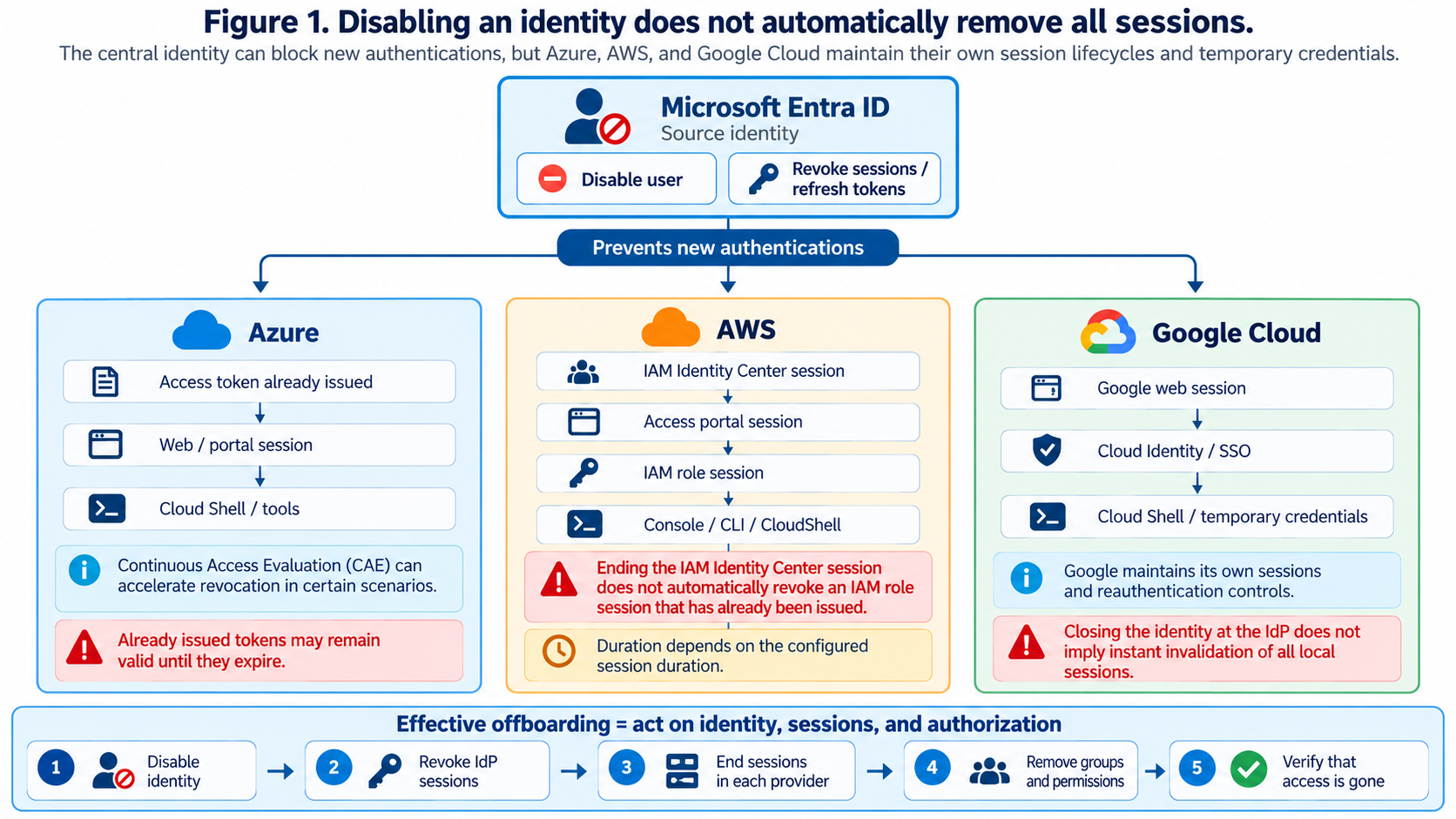
Figure 1. Disabling an identity prevents new authentications, but already-issued sessions can follow their own lifecycle in each provider.
What really happens when we disable a user in Entra ID
In Microsoft Entra ID, we can disable an account and revoke its sessions.
The revokeSignInSessions operation invalidates refresh tokens issued to the user and Entra ID session cookies. The goal is to prevent the user from silently renewing access and force a new authentication.
Microsoft Graph — revokeSignInSessions
However, Microsoft explicitly documents that already-issued access tokens can remain valid until they expire unless the resource supports mechanisms such as Continuous Access Evaluation.
Microsoft Entra ID — Revoke user access
So disabling the user and revoking their sessions is a fundamental part of the process, but by itself it does not guarantee that every application or external provider has also invalidated all of its local sessions.
Azure: the case closest to Entra ID
Azure is the provider where the relationship between identity and access control is most direct because Microsoft Entra ID is also the authentication foundation of the Azure ecosystem itself.
Even so, there is still a difference between preventing the user from obtaining new tokens and making every token already issued disappear.
Microsoft explains that, in the traditional model, an access token may continue to be accepted until it expires. In applications that support Continuous Access Evaluation (CAE), critical events such as account disablement or session revocation can propagate close to real time.
Microsoft Entra ID — Continuous Access Evaluation
The lesson is not that Azure is insecure. The lesson is that even within the same ecosystem we must distinguish between a disabled identity and an already-issued credential.
AWS: the separation is especially clear
In AWS, when using an external identity provider with IAM Identity Center, several layers of session can coexist:
Microsoft Entra ID
        ↓
IdP session
        ↓
AWS IAM Identity Center
        ↓
AWS access portal session
        ↓
IAM role session
        ↓
AWS Console / CLI / CloudShell
Disabling the user in Entra ID prevents them from authenticating again successfully through the IdP.
Ending the user’s IAM Identity Center session prevents them from continuing to use the access portal to create new sessions.
But AWS documents an important distinction: ending the active IAM Identity Center session does not automatically terminate IAM role sessions that have already been issued.
AWS IAM Identity Center — View and end active sessions
Those role sessions continue until they reach the duration configured in the Permission Set. That duration can be as long as 12 hours.
AWS IAM Identity Center — Session duration for AWS accounts
Revoking an IAM Identity Center session is not the same as revoking an IAM role session that has already been issued.
This distinction is especially relevant if the user has elevated privileges or if the revocation is part of a security incident.
What if I need to cut off AWS access immediately?
AWS has a specific procedure for situations where we cannot wait for a role session to expire.
The documented recommendation is to combine access revocation with an explicit Deny policy that blocks the user’s actions while existing sessions finish expiring.
AWS IAM Identity Center — Use a Deny policy to revoke active user permissions
It is a good example of a broader principle:
once a credential already exists, preventing new authentications may not be enough; authorization may also need to be blocked.
Google Cloud: SAML does not mean going back to Entra ID on every request
In the architecture described in the previous article, Google Cloud uses Cloud Identity to represent users and SAML to delegate authentication to Entra ID.
That does not mean every Google Cloud operation goes back to Entra ID.
Once the user has signed in, Google maintains its own sessions and credentials. That is why there are dedicated controls for session duration and reauthentication.
Google Cloud — Session controls for reauthentication
Google also provides an administrative mechanism to sign a user out of web and device sessions and reset their sign-in cookies.
Google Admin SDK — users.signOut
Again, the logic is the same: the central IdP controls the ability to authenticate, but the cloud provider controls the lifecycle of sessions it has already issued.
Federation is not the problem
It may seem that this complexity is a disadvantage of federated identity. It is not.
Without federation, we would have the same session problem, plus separate accounts, passwords, and credentials to manage in every provider.
Federation greatly improves control over the identity lifecycle.
What it does not do is turn every cloud into a single global session platform.
One central identity
        ≠
One global session
Offboarding is not a single button
A properly designed offboarding process should act on several layers.
1. Disable the source identity
             ↓
2. Revoke IdP sessions and refresh tokens
             ↓
3. End sessions in the cloud providers
             ↓
4. Remove groups, assignments, and permissions
             ↓
5. Block active sessions if the risk requires it
             ↓
6. Verify that access is gone
In a normal environment, some of these steps can be automated through provisioning, SCIM, or identity workflows.
In a compromise scenario, however, we should assume the user may still have an active session and the goal is to minimize the time during which that session remains useful.
Session duration is a security decision
An eight- or twelve-hour session may be convenient for the user.
It may also mean several hours of exposure if a temporary credential falls into the wrong hands.
That is why session duration should not be chosen purely for convenience.
In the training labs, I have preferred relatively short sessions because they offer a good balance between usability and control.
The higher the privilege, the less sense an unnecessarily long session makes.
What I would automate in production
In a real-world design, ideal offboarding should not depend on an administrator remembering a manual checklist.
A workflow could react to the disablement of an identity and automatically execute the required actions in each provider:
Event in Entra ID
      ↓
Offboarding workflow
      ├── Revoke Entra sessions
      ├── End AWS Identity Center sessions
      ├── Remove assignments and groups
      ├── Sign out Google sessions
      └── Generate verification evidence
For privileged accounts, it would also make sense to have a dedicated emergency procedure that can apply Deny controls or equivalent mechanisms while existing temporary credentials expire.
The final test: can the user still do anything?
A good offboarding process should not end when the console says the user is disabled.
It should end when we have verified that:
- the user cannot authenticate again;
- the user cannot create new sessions;
- existing sessions have ended or been blocked;
- assignments and permissions have been removed;
- and the logs show that access has stopped.
That final step makes offboarding verifiable and auditable.
The idea that closes the series
This series began with an architecture that was easy to summarize:
One person, one identity, three clouds.
But a mature identity architecture needs a second sentence:
One central identity does not imply one central session.
Microsoft Entra ID can be the source identity for Azure, AWS, and Google Cloud.
AWS can receive users and groups through SCIM and authenticate them through SAML.
Google Cloud can use Cloud Identity as its local representation and delegate authentication.
And each provider can preserve its native authorization model.
But when the time comes to remove access, we must remember that already-issued tokens and sessions have a lifecycle of their own.
Designing identity correctly matters.
Designing revocation correctly matters just as much, if not more.
References
Microsoft Entra ID — Revoke user access
Microsoft official documentation
Microsoft Graph — revokeSignInSessions
Microsoft official documentation
Microsoft Entra ID — Continuous Access Evaluation
Microsoft official documentation
AWS IAM Identity Center — Understanding authentication sessions
AWS official documentation
AWS IAM Identity Center — Revoke user access
AWS official documentation
Google Cloud — Session controls for reauthentication
Google Cloud official documentation
Google Admin SDK — users.signOut
Google official documentation
Interested in Cloud Security?
Technical analysis, hands-on labs and real-world cloud security insights.

Francisco Sepúlveda
Cloud Computing & Cybersecurity Instructor, Learning Experience Designer
Instructor and consultant in Cloud Computing, Cybersecurity and AI, with more than 25 years of hands-on experience in real enterprise environments. I design and deliver technical training programs, combining deep subject-matter expertise with learning experience design to make complex security concepts stick. I share practical, applied analysis on Cloud Security in Practice.
More about me →