
How I use Microsoft Entra ID as the identity source for Google Cloud, with Cloud Identity, selective provisioning, SAML, and native IAM.
In the first two articles in this series, I explained the overall goal of the multicloud architecture and then went into detail about the AWS integration. The underlying idea remains the same: keep a common identity without trying to replace each cloud provider’s authorization model. In Google Cloud, however, the path is different from AWS. In the model I use in some training labs, an additional component appears: Cloud Identity. The simplified flow looks like this:Microsoft Entra ID
│
├── User and group provisioning
▼
Google Cloud Identity
│
├── Google identities and groups
│
└── SAML SSO → authentication in Entra ID
│
▼
Google Cloud IAM
│
▼
Project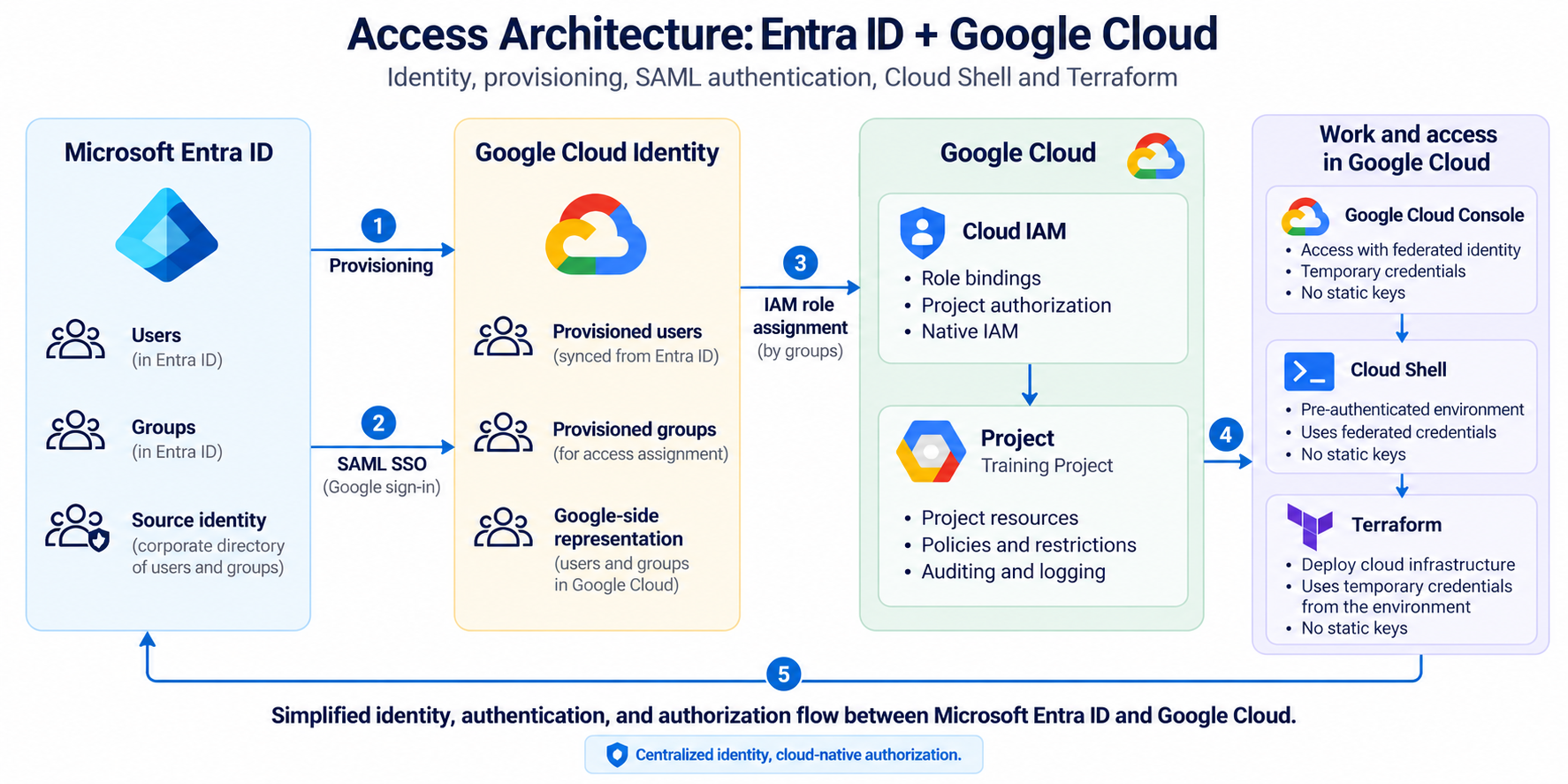
Why does Cloud Identity appear?
If Microsoft Entra ID already knows the users, why do we also need Cloud Identity? Because in this model Google Cloud needs a corresponding Google identity that its services can use and that can be referenced in IAM policies. Google documents this pattern explicitly: users and groups can be provisioned from Microsoft Entra ID into Cloud Identity or Google Workspace, while authentication is then delegated back to Entra ID through SAML. Google Cloud — Microsoft Entra ID user provisioning and single sign-on In the lab environment, I use Cloud Identity Free, which is enough to represent users and groups without turning the training environment into a Google Workspace deployment.Entra ID remains the source; Cloud Identity keeps the representation Google Cloud needs.
Provisioning and authentication are two different things
Provisioning means creating and maintaining the identity objects Google needs. Authentication means proving who the user is when they try to sign in.Provisioning
Entra ID ───────────────▶ Cloud Identity
Authentication
User ─▶ Google ─▶ SAML ─▶ Entra IDTwo connectors, not one
One implementation detail worth highlighting is that I use two separate instances of the Google Cloud / G Suite Connector by Microsoft. One is dedicated to provisioning and the other to Single Sign-On.Microsoft Entra ID
Enterprise App 1
Google Cloud / G Suite Connector
└── Provisioning
Enterprise App 2
Google Cloud / G Suite Connector
└── SAML SSODo not use a Super Admin account for provisioning
For Entra ID to create and maintain users and groups in Cloud Identity, it needs an administrative account. The easiest option would be to use an account with Super Admin privileges. That is not the approach I prefer. In the lab, I use a dedicated automation account, placed in a separate organizational unit.Cloud Identity
/Automation
provisioning-service
/Training
student-01
student-02
student-03
...A dedicated OU for training identities
Provisioned users are not mixed with the rest of the identities in the domain. I place them in a dedicated organizational unit, for example:/TrainingNot everyone has to use SSO
Configuring SAML in Google does not necessarily mean federating the entire organization. In the lab, the SSO profile is assigned only to the training identities.Cloud Identity
/Automation → protected local authentication
/Training → SAML SSO with Entra IDThe practical problem with groups
During implementation, one particularly interesting detail appeared. In Google, groups need a valid email address. But Entra ID security groups do not always have themail attribute populated.
If the connector tries to use that field as the group identifier, provisioning can fail because the property required to create the Google object is missing.
The solution I use is to derive the group email address deterministically from its name.
Entra ID displayName
Student-01

        ↓ transformation

g-student-01@training.example.comProvisioning a group still does not grant permissions
As with AWS, synchronizing a user or group does not automatically grant access to resources. Cloud Identity contains the object. Google Cloud IAM decides what it can do.Provisioned group
↓
Google Cloud IAM
↓
Role
↓
Projectg-student-01@training.example.com
↓
Owner
↓
Project Student-01Identity can be centralized; authorization remains native to Google Cloud.
Cloud Shell simplifies the lab again
Once the participant signs in to Google Cloud with the federated identity, they can open Google Cloud Shell directly in the browser.Entra ID
↓
SAML SSO
↓
Google Cloud Console
↓
Cloud Shell
↓
TerraformWhat about Application Default Credentials?
When a tool needs to access Google Cloud APIs using a user identity, another common concept appears: Application Default Credentials, or ADC. User-based credentials also have a lifecycle and are affected by session policies. Google documents that when the corresponding session expires, reauthentication may be required to refresh those credentials. Google Cloud — ReauthenticationIdentity, authorization, and session have related lifecycles, but they are not the same thing.
Time is also part of access control
Google Cloud allows session controls to be applied and periodic reauthentication to be required. Reauthentication controls for Google Cloud services can be configured through Access Context Manager and session policies. Google Cloud — Session controls for reauthenticationWho the user is → Entra ID
Which identity exists → Cloud Identity
What they can do → Google Cloud IAM
For how long → Session controlsWhy not Workforce Identity Federation?
Google Cloud also offers Workforce Identity Federation, which allows users from an external identity provider to be federated without first synchronizing them as Cloud Identity accounts. It is a very interesting option and, for some designs, can reduce the need to maintain duplicated identities. Google Cloud — Workforce Identity Federation with Microsoft Entra ID But this article deliberately describes the architecture used in these labs, where Cloud Identity is part of the design and provisioned groups are used directly in project-level IAM policies.The complete chain
                 Microsoft Entra ID
                        │
          ┌─────────────┴─────────────┐
          │                           │
  Provisioning                    SAML SSO
          │                           │
          ▼                           │
    Cloud Identity ◀──────────────────┘
          │
    Users + Groups
          │
          ▼
   Google Cloud IAM
          │
       Role binding
          │
          ▼
       Project
          │
          ▼
    Google Cloud Shell
          │
          ▼
TerraformWhat I take away from this architecture
The most interesting part of this design is not that the user only has to remember one password. It is that we can properly separate identity, representation, authentication, and authorization. Entra ID remains the system where the identity is created and disabled. Cloud Identity represents that identity inside the Google ecosystem. SAML allows credentials to be validated by the corporate IdP. Google Cloud IAM keeps control over the actual permissions. And Cloud Shell lets us work with tools such as Terraform without introducing a collection of static secrets on student workstations.Next article
There is one topic that has already appeared twice in this series and deserves its own article: I disabled the user in Entra ID… why did they still have cloud access? In the next article, I will look at the difference between identity and session, why already-issued temporary credentials can remain valid, and what this means for offboarding and incident response in federated environments.References
Google Cloud — Microsoft Entra ID user provisioning and single sign-on Google Cloud official documentation Google Cloud — Federate Google Cloud with Microsoft Entra ID Google Cloud official documentation Google Cloud — Cloud Identity overview Google Cloud official documentation Google Cloud — Reauthentication Google Cloud official documentation Google Cloud — Workforce Identity Federation with Microsoft Entra ID Google Cloud official documentationInterested in Cloud Security?
Technical analysis, hands-on labs and real-world cloud security insights.

Francisco Sepúlveda
Cloud Computing & Cybersecurity Instructor, Learning Experience Designer
Instructor and consultant in Cloud Computing, Cybersecurity and AI, with more than 25 years of hands-on experience in real enterprise environments. I design and deliver technical training programs, combining deep subject-matter expertise with learning experience design to make complex security concepts stick. I share practical, applied analysis on Cloud Security in Practice.
More about me →