
How I use Microsoft Entra ID as the central identity source for training labs across Azure, AWS, and Google Cloud.
When I prepare multicloud labs for some of my training courses, a problem appears very early that has little to do with deploying virtual machines, networks, or storage: how to manage participant identities in a way that is simple, secure, and maintainable.
I could create a separate identity in Azure, another one in AWS, and another one in Google Cloud. It would work, but it would multiply the administrative effort and make onboarding, offboarding, and access revocation more difficult once the training is over.
That is why, in some of my lab environments, I use a different approach: Microsoft Entra ID acts as the central identity source for all three platforms.
The goal can be summarized in one sentence:
One person, one identity, three clouds.
The architecture described in this article is based on a real training environment, but names, domains, account identifiers, project IDs, and other operational details have been deliberately simplified or anonymized.
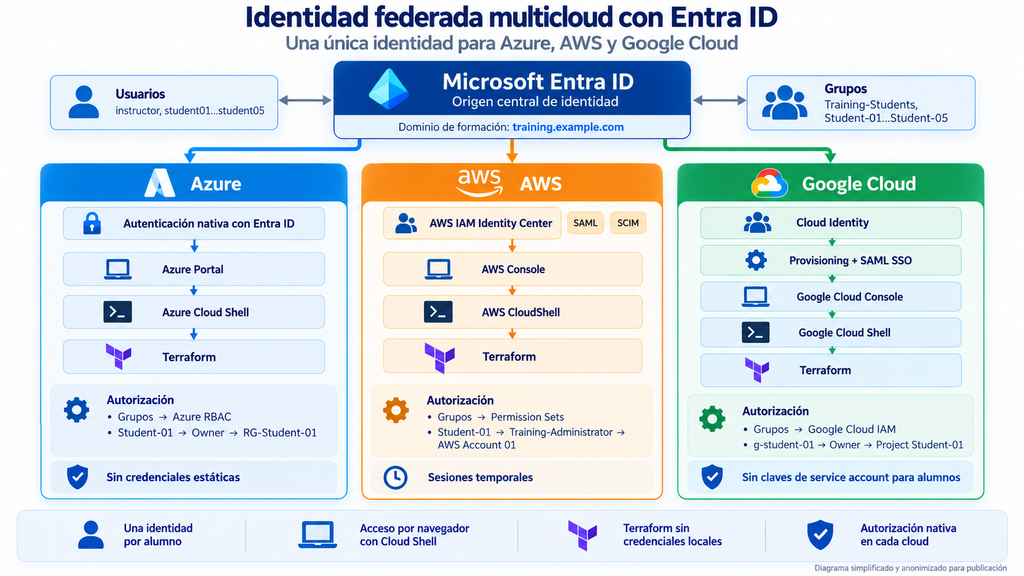
Figure 1. Simplified and anonymized multicloud identity architecture used in the labs.
One common identity does not mean one common IAM system
There is an important distinction worth making from the start.
Centralizing identity does not mean replacing the authorization systems of Azure, AWS, or Google Cloud.
In this design, Microsoft Entra ID primarily answers one question:
Who is this user?
Each cloud provider then answers another question independently:
What is this user allowed to do here?
That separation between authentication and authorization is one of the aspects I like most about this architecture.
Azure continues to use Azure RBAC, AWS keeps IAM Identity Center, Permission Sets, and its own policies, and Google Cloud continues to rely on its own IAM model.
Microsoft Entra ID provides a common identity layer, while each cloud keeps its native security model.
Azure: the most direct integration
Azure is the simplest case because it uses Microsoft Entra ID identities directly.
Participants authenticate with the same identity used across the environment, while Azure RBAC determines what they are allowed to manage.
Azure RBAC lets you assign roles to users or groups at a specific scope, such as a subscription, Resource Group, or individual resource. (learn.microsoft.com)
In a training lab, the model can be as simple as:
User
  ↓
Group
  ↓
Azure RBAC
  ↓
Lab Resource Group
This allows a participant to have significant freedom inside their own environment without receiving administrative privileges over Microsoft Entra ID or over resources belonging to other participants.
That distinction is important: giving users freedom inside a sandbox does not mean giving them privileges over the entire platform.
AWS: federation through IAM Identity Center
AWS requires an additional component: AWS IAM Identity Center.
Instead of creating IAM Users for every participant, Microsoft Entra ID is configured as an external identity provider.
The integration uses two different protocols:
SAML 2.0 for authentication.
SCIM 2.0 for provisioning and synchronizing users and groups.
AWS officially documents the integration between Microsoft Entra ID and IAM Identity Center using both mechanisms. (docs.aws.amazon.com)
Conceptually:
Microsoft Entra ID
        │
        ├── SAML → authentication
        │
        └── SCIM → users and groups
                         │
                         ▼
              AWS IAM Identity Center
                         │
                         ▼
                  Permission Sets
                         │
                         ▼
                    AWS Account
The distinction between SAML and SCIM matters.
SAML allows AWS to trust Entra ID when a user signs in, but it does not provide a mechanism for AWS to discover which users and groups exist in the identity provider. That is where SCIM comes in. (docs.aws.amazon.com)
Once inside AWS, authorization remains an AWS responsibility.
IAM Identity Center assigns Permission Sets to users or groups for specific accounts, while higher-level controls such as AWS Organizations Service Control Policies still apply regardless of how the user authenticated.
I will go into much more detail on this part in the next article.
Google Cloud: Entra ID and Cloud Identity
Google Cloud uses a different model.
In this architecture, I use Cloud Identity to maintain a representation of users and groups inside the Google ecosystem, while Microsoft Entra ID remains the identity source and the system used for authentication.
Google documents exactly this pattern: users and groups can be provisioned from Entra ID into Cloud Identity, while authentication can then be delegated back to Entra ID using SAML. (docs.cloud.google.com)
The simplified flow looks like this:
Microsoft Entra ID
        │
        ├── Provisioning
        ▼
   Cloud Identity
        │
        └── Users and groups
                 │
                 ▼
         Google Cloud IAM
                 │
                 ▼
              Project
Provisioning and authentication are two different processes.
One thing is making sure that a user exists inside Cloud Identity and can be referenced by Google Cloud IAM.
Another is deciding who validates that user’s credentials when they sign in.
In this architecture, authentication is delegated to Microsoft Entra ID using SAML. (docs.cloud.google.com)
Again, authorization remains under the control of the cloud provider.
Groups can receive roles on specific projects without Entra ID needing to understand the internal details of Google Cloud IAM.
Cloud Shell changes the design significantly
Another decision that greatly simplifies this type of environment is the use of the providers’ Cloud Shell environments.
Participants sign in through the browser using their federated identity and can then work with the platform CLI tools directly from the browser.
The flow is roughly:
Microsoft Entra ID
        ↓
Cloud provider
        ↓
Cloud Shell
        ↓
Terraform
This has an important security consequence: there is no need to distribute long-lived credentials to participants.
In AWS, there is no need to create IAM Access Keys.
In Google Cloud, there is no need to hand out private Service Account keys.
And in Azure, the user can work directly with the Entra ID identity used to open the session.
AWS also documents that users can sign in with existing identities and use automatically generated temporary credentials for command-line access. (docs.aws.amazon.com)
For a training environment, this is extremely useful: less local configuration on participant laptops and far fewer secrets to manage afterwards.
The real benefit is not having a single password
Single Sign-On is probably the most visible part of the architecture.
But I do not think it is the most important one.
The real benefit is centralizing the identity lifecycle.
At the beginning of a training course, I can enable the required identities and assign them to the appropriate groups.
During the course, each platform applies its own permissions.
And when the course is over, I can disable access at the identity source and remove the corresponding assignments from the cloud providers.
The model looks roughly like this:
Microsoft Entra ID
     Identity
     Authentication
     Lifecycle

          ↓

Azure              AWS               Google Cloud
Azure RBAC         IAM Identity      Cloud IAM
                   Center
The user experience is simple.
The security architecture behind it does not need to be.
And that is a good thing.
There is a catch: identity and session are not the same thing
During testing, this architecture exposed an especially interesting behavior.
Disabling a user in Microsoft Entra ID does not necessarily mean that every session already issued by the cloud platforms disappears immediately.
Temporary credentials, tokens, and previously issued sessions may have their own validity period.
That means the architecture also needs to consider session duration, token revocation, and access termination procedures.
It is interesting enough to deserve a separate article because it provides a very clear way to understand the difference between:
identity, authentication, authorization, and session.
I will come back to that later in this series.
A lab architecture, not a universal recipe
It is worth stressing that this design addresses a specific use case: multicloud training labs where each participant needs significant autonomy inside a controlled sandbox.
A real enterprise environment may require additional controls: much more granular least privilege, Privileged Identity Management, Conditional Access, Just-In-Time access, approval workflows, more restrictive policies, or additional compliance controls.
But the core architectural principle remains valid:
Centralizing identity does not require centralizing authorization.
Microsoft Entra ID can provide a common identity while each cloud provider keeps its own native access control mechanisms.
From the participant’s point of view, the result looks very simple:
one identity for Azure, AWS, and Google Cloud.
Behind that experience, there are still three platforms, three IAM models, and three independent authorization planes.
And that separation is one of the strengths of the design.
Next article
In the next article, I will go one level deeper and look at the integration that probably has the most moving parts:
Entra ID + AWS: SSO without IAM Users
We will look at the roles played by SAML and SCIM, how AWS IAM Identity Center fits into the architecture, how groups and Permission Sets are used, and how AWS CloudShell and Terraform can be used without distributing Access Keys to participants.
Interested in Cloud Security?
Technical analysis, hands-on labs and real-world cloud security insights.