
AWS Emulator in Practice · Part 02 · 5-minute read
In the first article in this series, I shared my initial AWS Emulator tests with S3, DynamoDB and SQS. The native installation worked well, but my first attempt with Docker didn’t go quite as planned.
The container started, the port was published, and yet I couldn’t connect to the emulator. I was getting a TLS error. The cause wasn’t the certificate: it was the network configuration.
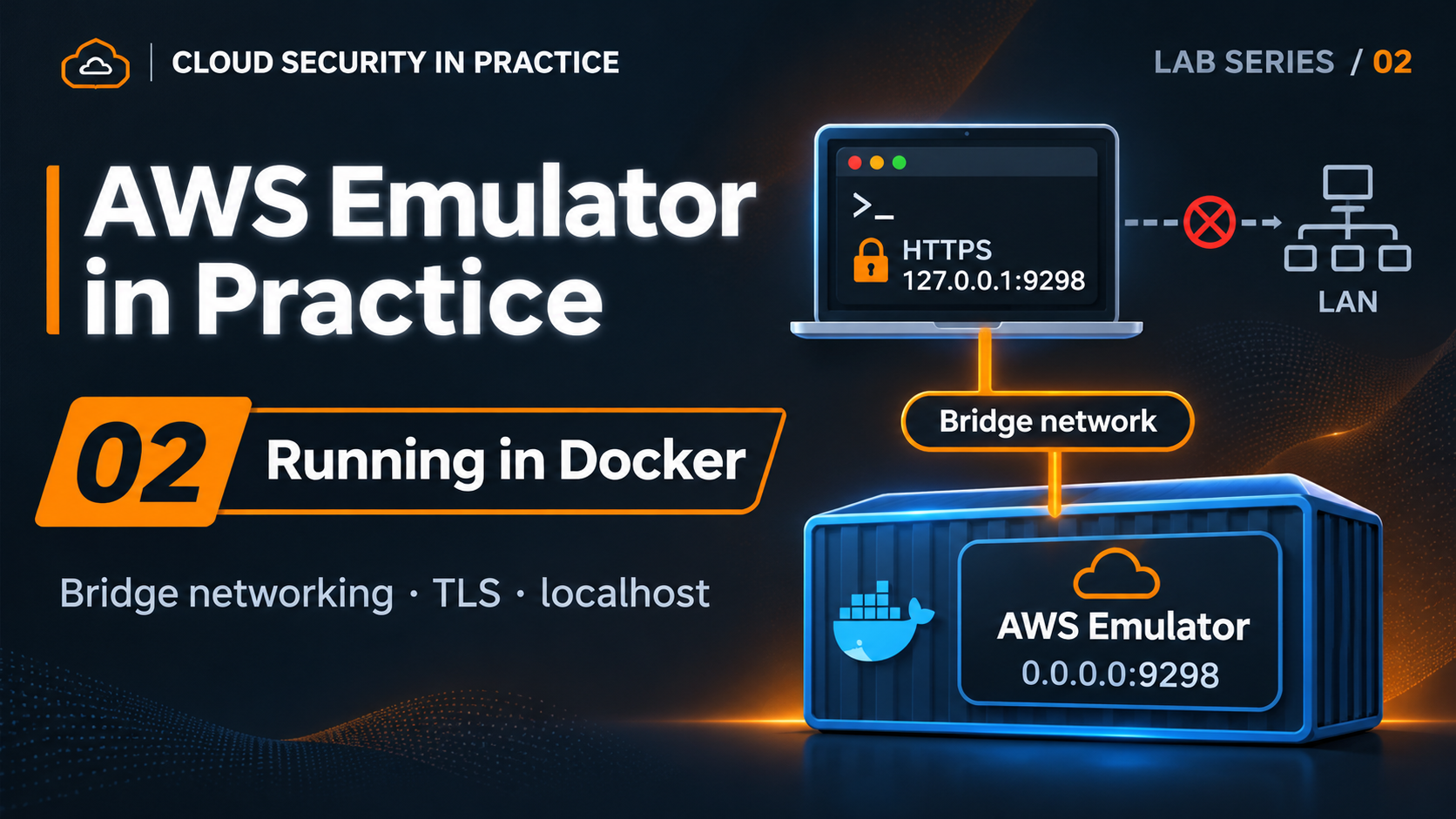
In this article, I want to share what I learned along the way and how I got AWS Emulator running in Docker without exposing its endpoint to the entire network.
The problem: whose localhost is it?
By default, AWS Emulator listens on 127.0.0.1:9297. That’s a sensible default for an application running locally.
Inside a container, however, 127.0.0.1 belongs to that container. Docker can publish a host port and forward traffic to the container’s network interface, but that doesn’t make a service listening only on its own loopback interface accept those connections.
My first Dockerfile omitted an option that AWS already includes in its official documentation:
ENTRYPOINT ["aws-emulator", "-b", "0.0.0.0"]This makes the emulator listen on all interfaces inside the container. Docker can now forward connections to its endpoint.
That brings us to a second decision: which host interfaces should the port be published on?
Using -p 9298:9298 can expose the service to other machines. By contrast, -p 127.0.0.1:9298:9298 restricts the published port to the host loopback in a conventional bridge configuration.
Listening on all container interfaces is not the same as publishing a service on all host interfaces. That distinction solved the problem without resorting to --network host.
Building and running the image
AWS documents how to build the image from Amazon Linux 2023. I’ve prepared a variant of its Dockerfile using the official AWS Emulator v1.0.341 RPM, with a fixed emulator version and a package-signature check before installation. The image runs the emulator as a non-root user.
To reproduce my setup on x86-64 Linux, with an up-to-date Docker installation and no real AWS credentials on the machine, use the Dockerfile in the repository:
git clone https://github.com/pacosepulveda/aws-emulator-in-practice-labs.git
cd aws-emulator-in-practice-labs

docker build -t aws-emulator:local \
  labs/01-getting-started/docker
In my lab, I use port 9298 for Docker, leaving 9297 available for a native instance. Start the container:
PORT=9298
mkdir -p "$HOME/.aws/emulator"

docker run --rm --name aws-emulator-lab \
  --memory=2g --memory-swap=2g \
  --user "$(id -u):$(id -g)" \
  -e HOME="$HOME" \
  -v "$HOME/.aws/emulator:$HOME/.aws/emulator" \
  -p "127.0.0.1:$PORT:$PORT" \
  aws-emulator:local -p "$PORT" -t off
Two details matter here. The volume shares only the directory containing emulator-generated credentials and certificates, not the entire ~/.aws directory. Also, keep the same port inside and outside the container: AWS uses that port number to generate configuration files.
The 2 GiB memory limit comes from the documented setup; it is not a measurement of actual memory consumption.
First check: TLS and credentials
In another terminal, with the AWS CLI installed, we can open a clean shell and use the files generated by this instance:
env -i HOME="$HOME" PATH="$PATH" bash --noprofile --norc

export PORT=9298
export AWS_ENDPOINT_URL="https://127.0.0.1:$PORT"
export AWS_SHARED_CREDENTIALS_FILE="$HOME/.aws/emulator/$PORT/emulator_credentials"
export AWS_CONFIG_FILE="$HOME/.aws/emulator/$PORT/config"
export AWS_CA_BUNDLE="$HOME/.aws/emulator/$PORT/ca.pem"
export AWS_EC2_METADATA_DISABLED=true
export AWS_DISABLE_HOST_PREFIX_INJECTION=true
export AWS_DEFAULT_REGION=us-east-1

curl --fail --cacert "$AWS_CA_BUNDLE" \
  "$AWS_ENDPOINT_URL/__admin/health"

aws sts get-caller-identity \
  --endpoint-url "$AWS_ENDPOINT_URL"
The health check should return ok, and STS should report account 000000000000. If either check fails, don’t proceed with resource creation.
Once the environment was configured, I repeated the S3, DynamoDB and SQS operations and the Python/Boto3 tests. They worked. There was no need to disable TLS verification or use real AWS credentials.
Two more lessons from the lab
The virtual CPU matters, too
On my Proxmox VM, Amazon Linux 2023 failed to start with the original virtual CPU model. Its system library required x86-64-v2 instructions that the VM wasn’t being presented with. Switching the CPU model to host fixed the problem in my environment.
This wasn’t an emulator or Docker bug. It was a compatibility issue between the base image and the CPU features exposed by the hypervisor.
Package verification in a minimal image
I also ran into problems trying to use GnuPG inside Amazon Linux 2023-minimal. Our Dockerfile instead uses RPM package verification through rpmkeys and rpm -K. In a negative test, we altered one byte in the package and confirmed that verification rejected it. The details are in the repository.
A security consideration worth paying attention to
The Docker documentation warns about versions older than 28.0.0: under certain conditions, machines on the same network segment could reach ports published to localhost.
I upgraded Docker in the lab VM and checked from another machine on the LAN that a TCP connection to the published port was refused. I didn’t rely solely on inspecting the host’s listening addresses.
That confirms the result for our particular configuration, not universal isolation for every Docker network. Routing, firewall rules and network options still matter.
And remember that AWS advises against using the emulator to test security. Running as a non-root user in a container reduces privileges, but it does not make the environment a safe sandbox for untrusted code.
Final results and what’s next
The reference run with AWS Emulator v1.0.341 and Docker 29.9.3 passed all 9 checks in the Docker experiment. They covered the image build, AWS CLI and Boto3 operations, host access, observed LAN isolation and coexistence of native and Docker instances.
In a subsequent review of the automated script, we strengthened health checks, STS identity validation, error handling and cleanup. The updated regression suite passed all 13 checks. The original results and this revision refer to different test suites.
My takeaway is that Docker offers a promising foundation for ephemeral development environments and integration testing. But it’s worth understanding the networking, credentials and application state before introducing it into a CI/CD pipeline.
In the next article, we’ll look at a different question: what happens when we deploy infrastructure with Terraform against the emulator? We’ve already encountered some DynamoDB behavior that deserves a closer look.
Reproduce the lab
The public repository for this series contains the Dockerfile, experiments, earlier issues and test results. The reference run took place on November 13, 2026, in a Debian 13 VM.
References
- AWS Emulator: Getting started with Docker
- Docker: Port publishing and mapping
- Security in AWS Emulator
Related articles
Interested in Cloud Security?
Technical analysis, hands-on labs and real-world cloud security insights.

Francisco Sepúlveda
Cloud Computing & Cybersecurity Instructor, Learning Experience Designer
Instructor and consultant in Cloud Computing, Cybersecurity and AI, with more than 25 years of hands-on experience in real enterprise environments. I design and deliver technical training programs, combining deep subject-matter expertise with learning experience design to make complex security concepts stick. I share practical, applied analysis on Cloud Security in Practice.
More about me →