
How I use Microsoft Entra ID, SAML, SCIM, and AWS IAM Identity Center to provide access to AWS accounts without distributing long-lived credentials.
In the first article in this series, I explained the overall architecture: using Microsoft Entra ID as the central identity source for labs spanning Azure, AWS, and Google Cloud, while keeping authorization inside each cloud provider.
In AWS, this raises an interesting question.
If identities live in Entra ID, how can a participant access an AWS account, use the console, open CloudShell, and work with Terraform without creating an IAM User or handing out Access Keys?
In my case, the answer is AWS IAM Identity Center.
The architecture described here is based on a real training environment I use in some of my labs, but names, domains, account identifiers, and other operational details have been deliberately anonymized or simplified.
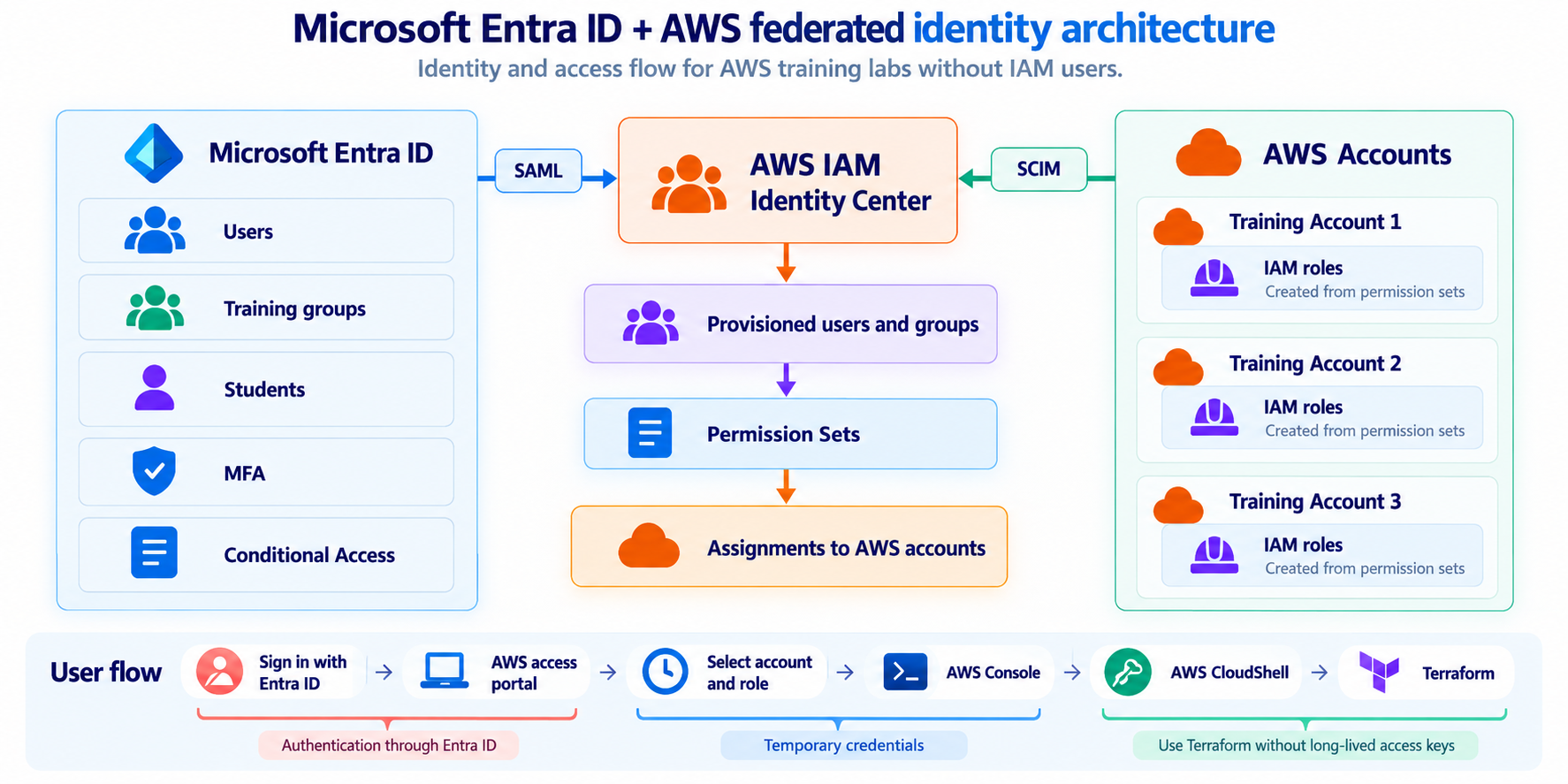
Figure 1. Simplified identity and authorization flow between Microsoft Entra ID and AWS.
The goal: the user should not exist as an IAM User
For many years, one of the most common ways to provide programmatic access to AWS was to create an IAM User and generate:
AWS_ACCESS_KEY_ID
AWS_SECRET_ACCESS_KEY
In a training lab, that quickly becomes inconvenient.
You need to distribute those credentials, store them somewhere, make sure they do not end up in a repository, and remember to revoke them once the course is over.
In this environment, I wanted to remove that requirement entirely.
The target model was:
Microsoft Entra ID
        ↓
AWS IAM Identity Center
        ↓
AWS Account
        ↓
Console / CloudShell
        ↓
Terraform
The participant keeps their identity in Entra ID.
There is no equivalent IAM User created inside each AWS account.
Instead, IAM Identity Center provisions IAM roles associated with Permission Sets, rather than individual IAM users. AWS documentation
IAM Identity Center as the integration point
AWS IAM Identity Center is the component that connects corporate identities to AWS accounts.
In this case, Microsoft Entra ID is configured as an external identity provider.
But there are actually two separate problems to solve:
- How does the user prove who they are?
- How does AWS know which users and groups exist?
Two different standards are used for that:
SAML 2.0 → authentication
SCIM 2.0 → user and group provisioning
This distinction is probably the most important part of the entire integration.
SAML answers: “Who are you?”
When a participant needs to access AWS, the actual authentication takes place in Microsoft Entra ID.
User
  ↓
Microsoft Entra ID
  ↓
SAML assertion
  ↓
AWS IAM Identity Center
  ↓
AWS Access Portal
AWS trusts Entra ID as the Identity Provider.
As a result, AWS does not need to store or validate the participant’s password.
This also means that the authentication controls defined in Entra ID can continue to apply, such as MFA, Conditional Access, or other policies used in the environment.
But SAML alone does not solve the whole problem.
SCIM answers: “Which users and groups exist?”
IAM Identity Center needs to know in advance which users and groups may later receive access.
That is where SCIM — System for Cross-domain Identity Management comes in.
Microsoft Entra ID
        │
        │ SCIM
        ▼
AWS IAM Identity Center

Users
Groups
Memberships
AWS documents the use of SAML and SCIM together when integrating Microsoft Entra ID as an external identity provider for IAM Identity Center. AWS documentation
In Entra ID, I also follow a principle that I consider important: do not synchronize the entire directory unless you actually need to.
Only the users and groups required for the training environment should be provisioned into AWS.
Training-Students

Student-01
Student-02
Student-03
...
and provision only those objects into IAM Identity Center.
That keeps the AWS identity store limited to the population that should actually be able to use the training accounts.
Provisioning an identity does not grant access
Another point that can be confusing is that appearing in IAM Identity Center does not automatically grant access to AWS.
The user may exist. The group may exist. But permissions still need to be defined.
That is where Permission Sets come in.
Group
  ↓
Permission Set
  ↓
AWS Account
For example:
Student-01
      ↓
Lab-Administrator
      ↓
AWS Account 01
A user who belongs to Student-01 can then use the assigned Permission Set in that AWS account.
IAM Identity Center creates the required IAM roles in the target accounts where the Permission Set is provisioned. AWS documentation
This separation is useful because identity and permissions can evolve independently.
Changing the participant does not require redesigning the AWS policies. In many cases, changing group membership is enough.
Administrative permissions for a student?
This is where the training scenario matters.
In some labs, participants need significant freedom: creating networks, instances, buckets, policies, roles, and other resources.
That may justify using a Permission Set with broad privileges.
In a normal production environment, that would probably be a bad idea.
In a training lab, the context is different because each participant works in a dedicated AWS account, with additional controls applied from AWS Organizations.
Permission Set
broad permissions
       │
       ▼
Isolated AWS account
       │
       ▼
Service Control Policies
       │
       ▼
Actual maximum allowed
An SCP can, for example, block certain services, regions, or resource types regardless of the permissions granted by the Permission Set.
This is a pattern I use quite often in training environments: freedom inside the sandbox, limits outside it.
Instead of building an extremely restrictive IAM model for every single lab, I prefer to give participants autonomy inside their training account and use organizational guardrails to prevent actions that should not be allowed.
The other guardrail: time
Permission Sets have another important property: Session duration.
AWS allows you to configure how long the session associated with a Permission Set remains valid. The default is one hour, and AWS supports values between one and twelve hours. AWS documentation
In training labs, I prefer short-lived sessions.
Who can sign in        → Entra ID
Where they can sign in → IAM Identity Center
What they can do       → Permission Set + SCP
For how long           → Session Duration
That last point became more important than it initially appeared.
I will come back to it when discussing session revocation and what happens when an identity is disabled in Entra ID while AWS credentials are still valid.
AWS CloudShell removes another problem
Once the participant has access to the AWS account, another question remains: how do they use AWS CLI or Terraform?
One option is to configure AWS CLI locally with IAM Identity Center. AWS supports this model and can obtain and refresh temporary credentials through aws configure sso. AWS documentation
But for training labs, there is an even simpler option: AWS CloudShell.
CloudShell is a browser-based shell that is already authenticated. When it is opened from the AWS Management Console, the credentials associated with the current console session are automatically available inside the shell. AWS documentation
Entra ID
   ↓
IAM Identity Center
   ↓
AWS Console
   ↓
CloudShell
without running aws configure and, more importantly, without entering an Access Key or Secret Access Key.
And then Terraform fits naturally
In these labs, Terraform runs from CloudShell.
Sign in with Entra ID
        ↓
Select AWS account
        ↓
Open CloudShell
        ↓
terraform init
terraform plan
terraform apply
Terraform can use the temporary credentials already available in the environment.
That means the participant does not need a ~/.aws/credentials file containing long-lived credentials created specifically for them.
This solves two problems at once: much less configuration before starting the lab, and no long-lived personal credentials that later need to be tracked down and revoked.
The complete trust chain
                  Microsoft Entra ID
                         │
             ┌───────────┴───────────┐
             │                       │
           SAML                    SCIM
             │                       │
             │                 Users + Groups
             └───────────┬───────────┘
                         ▼
              AWS IAM Identity Center
                         │
                    Group mapping
                         │
                         ▼
                  Permission Set
                         │
                         ▼
                    AWS Account
                         │
               ┌─────────┴─────────┐
               ▼                   ▼
          AWS Console         AWS CloudShell
                                   │
                                   ▼
                                Terraform
Several controls are layered together, but each has a different purpose.
Entra ID controls identity.
SAML provides federated authentication.
SCIM maintains users and groups.
IAM Identity Center connects groups, accounts, and Permission Sets.
IAM policies define permissions inside the account.
AWS Organizations can impose upper limits through SCPs.
Session duration limits how long issued credentials remain usable.
This architecture is more complex than creating an IAM User and generating two keys.
But it also removes a significant amount of security debt.
Onboarding and offboarding become much simpler
The value of this model becomes especially clear at the beginning and end of the identity lifecycle.
To onboard a new participant, I do not need to create IAM Users across multiple AWS accounts. I work with identities and groups.
And when the training ends, the process can look like this:
Disable identity in Entra ID
            ↓
Revoke sessions
            ↓
Remove IAM Identity Center assignments
            ↓
Clean the training account
The AWS account can then be reused for another edition of the course.
The identity accessing it can be completely different.
And there is no collection of personal Access Keys left behind.
But there is one important surprise
Disabling a user in Entra ID does not necessarily mean that an AWS session already issued to that user disappears immediately.
Identity state, the IAM Identity Center session, and temporary role credentials have related but distinct lifecycles.
During testing, this became an important detail for incident response and for designing a proper offboarding process.
It deserves its own article.
What I take away from this architecture
If I had to summarize the design in one sentence, it would not be: “We implemented SSO.”
The user needs an identity, not Access Keys.
Federation keeps identity in the corporate identity system.
IAM Identity Center translates that identity into the AWS access model.
Permission Sets provide permissions. AWS Organizations provides guardrails. CloudShell provides an already authenticated working environment. And Terraform can operate using temporary session credentials.
For a multicloud training lab, that combination works particularly well.
But the same principles apply far beyond training: centralized identities, federated access, temporary credentials, and cloud-native authorization.
Next article
In the next article, I will cover the other half of the architecture:
Entra ID + Google Cloud: Federation, Cloud Identity, and SAML
We will look at why Cloud Identity is involved, how users and groups are provisioned from Entra ID, what role SAML plays, and how those groups eventually receive permissions on Google Cloud projects.
References
AWS — Microsoft Entra ID + AWS IAM Identity Center
AWS official documentation
AWS — Permission Sets in IAM Identity Center
AWS official documentation
AWS — Permission Set session duration
AWS official documentation
AWS — IAM Identity Center credentials for CLI and SDK access
AWS official documentation
AWS — CloudShell and IAM
AWS official documentation
Interested in Cloud Security?
Technical analysis, hands-on labs and real-world cloud security insights.

Francisco Sepúlveda
Cloud Computing & Cybersecurity Instructor, Learning Experience Designer
Instructor and consultant in Cloud Computing, Cybersecurity and AI, with more than 25 years of hands-on experience in real enterprise environments. I design and deliver technical training programs, combining deep subject-matter expertise with learning experience design to make complex security concepts stick. I share practical, applied analysis on Cloud Security in Practice.
More about me →